Note: This is an auto-generated Markdown version of the Jupyter notebook
FieldDevelopmentWorkflow.ipynb. You can also view it on nbviewer or open in Google Colab.
This tutorial builds an auditable gas-production forecast and after-tax cash flow from current NeqSim APIs. It deliberately uses the lower-level production-profile and economics classes so every unit conversion and assumption is visible.
Engineering boundary: this is a deterministic screening example, not a reserves estimate, concept approval, FEED model, or investment recommendation. Replace the synthetic rates, costs, prices, fiscal basis, and decline assumptions with traceable project data and qualified engineering models.
1. Runtime setup
The setup installs the current public neqsim package only when it is missing. Restart the runtime after changing the installed NeqSim version.
import importlib.util
import subprocess
import sys

if importlib.util.find_spec("neqsim") is None:
    subprocess.check_call(
        [sys.executable, "-m", "pip", "install", "-q", "neqsim"]
    )
import math

import matplotlib.pyplot as plt
from neqsim import jneqsim  # Starts the JVM and exposes the packaged NeqSim JAR.

ProductionProfileGenerator = (
    jneqsim.process.fielddevelopment.economics.ProductionProfileGenerator
)
DeclineType = ProductionProfileGenerator.DeclineType
CashFlowEngine = jneqsim.process.fielddevelopment.economics.CashFlowEngine

DAYS_PER_YEAR = 365.25
2. Define the screening basis
The example represents a synthetic four-well gas development. Throughout this tutorial, Sm³ uses a 15 °C and 1.01325 bara accounting basis. ProductionProfileGenerator treats the supplied volumes numerically; it does not perform a standard-condition conversion. Rates are standard cubic metres per day, and yearly profile values are standard cubic metres per year. Monetary inputs and outputs are million US dollars unless the API label states otherwise. The synthetic costs are teaching inputs, not an AACE-classified estimate.
| Assumption | Value |
|---|---|
| Plateau gas rate | 8.0 MSm³/d |
| Forecast start / life | 2028 / 20 years |
| Ramp / plateau | 1 / 4 years |
| Exponential decline | 12%/year |
| Illustrative CAPEX (not AACE-classified) | 1,384.5 MUSD over 2026–2027 |
| Fixed OPEX proxy | 4% of CAPEX/year |
| Gas price / tariff | 0.30 / 0.02 USD/Sm³ |
| Discount rate | 8% |
| Fiscal model | CashFlowEngine("NO") |
The ProductionProfileGenerator.generateFullProfile input is a daily rate, but each returned map value is an annual volume. Passing the annual value directly to addAnnualProduction avoids a second, erroneous multiplication by days per year.
def build_gas_case(
    name,
    plateau_rate_msm3_per_day,
    total_capex_musd,
    gas_price_usd_per_sm3=0.30,
):
    """Run one transparent deterministic gas-screening case."""
    peak_rate_sm3_per_day = plateau_rate_msm3_per_day * 1.0e6
    profile = ProductionProfileGenerator().generateFullProfile(
        peak_rate_sm3_per_day,
        1,
        4,
        0.12,
        DeclineType.EXPONENTIAL,
        2028,
        20,
    )
    annual_profile = {
        int(entry.getKey()): float(entry.getValue())
        for entry in profile.entrySet()
    }

    engine = CashFlowEngine("NO")
    engine.setCapex(0.77 * total_capex_musd, 2026)
    engine.addCapex(0.23 * total_capex_musd, 2027)
    engine.setOpexPercentOfCapex(0.04)
    engine.setGasPrice(gas_price_usd_per_sm3)
    engine.setGasTariff(0.02)

    for year, annual_gas_sm3 in annual_profile.items():
        engine.addAnnualProduction(year, 0.0, annual_gas_sm3, 0.0)

    result = engine.calculate(0.08)
    return {
        "name": name,
        "annual_profile": annual_profile,
        "engine": engine,
        "result": result,
    }
3. Generate and audit the production forecast
base_case = build_gas_case("Base case", 8.0, 1384.5)
base_profile = base_case["annual_profile"]

first_year = min(base_profile)
first_daily_rate_msm3 = (
    base_profile[first_year] / DAYS_PER_YEAR / 1.0e6
)
cumulative_gsm3 = sum(base_profile.values()) / 1.0e9

print(f"First-year average rate: {first_daily_rate_msm3:.6f} MSm³/d")
print(f"Twenty-year cumulative gas: {cumulative_gsm3:.6f} GSm³")

assert math.isclose(first_daily_rate_msm3, 8.0, rel_tol=0.0, abs_tol=1e-12)
assert cumulative_gsm3 > 0.0
Output
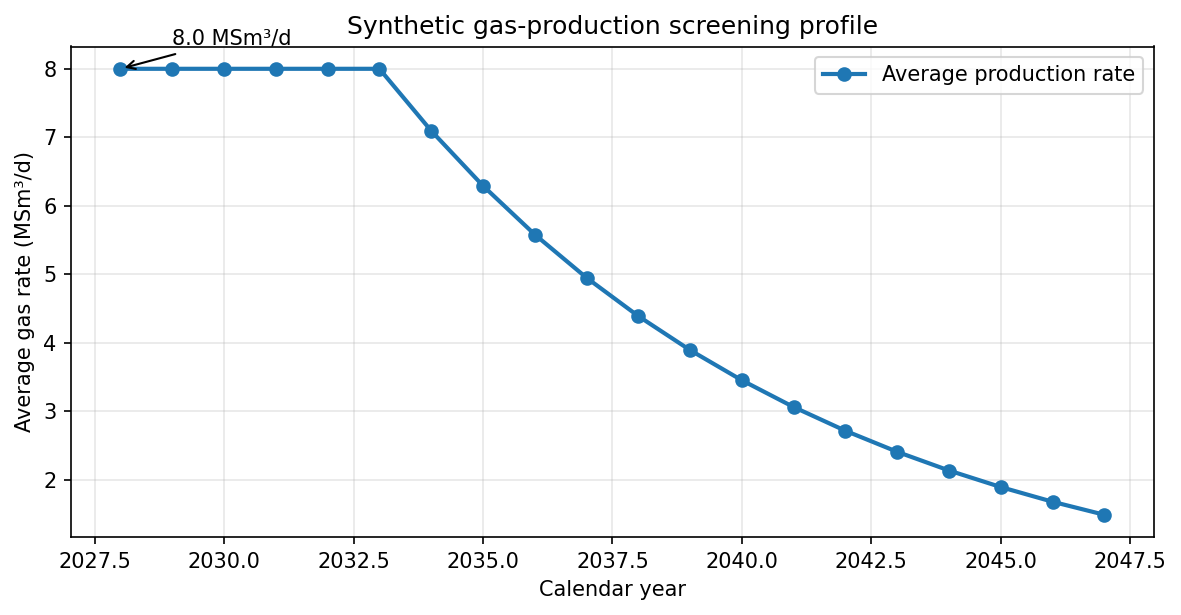
``` First-year average rate: 8.000000 MSm³/d Twenty-year cumulative gas: 36.178855 GSm³ ```years = list(base_profile)
daily_rates = [
base_profile[year] / DAYS_PER_YEAR / 1.0e6 for year in years
]
fig, ax = plt.subplots(figsize=(8, 4.2), dpi=150)
ax.plot(
years,
daily_rates,
marker="o",
linewidth=2,
label="Average production rate",
)
ax.annotate(
f"{daily_rates[0]:.1f} MSm³/d",
xy=(years[0], daily_rates[0]),
xytext=(years[0] + 1, daily_rates[0] + 0.35),
arrowprops={"arrowstyle": "->"},
)
ax.set(
title="Synthetic gas-production screening profile",
xlabel="Calendar year",
ylabel="Average gas rate (MSm³/d)",
)
ax.legend()
ax.grid(alpha=0.3)
fig.tight_layout()
plt.show()
4. Inspect the after-tax screening economics
The first figure shows the imposed plateau followed by exponential decline. It verifies the intended rate/volume conversion but does not establish reservoir deliverability.
The model is intentionally deterministic. Its NPV, IRR, payback, and break-even price depend entirely on the synthetic assumptions above and the selected NO fiscal implementation.
cash_result = base_case["result"]
break_even_gas_price = base_case["engine"].calculateBreakevenGasPrice(0.08)

print(cash_result.getSummary())
print(f"Break-even gas price: {break_even_gas_price:.6f} USD/Sm³")

assert math.isfinite(cash_result.getNpv())
assert math.isfinite(cash_result.getIrr())
assert cash_result.getTotalCapex() > 0.0
assert 0.0 < break_even_gas_price < 2.0
Output
``` === Cash Flow Summary === Project period: 2026 - 2047 (22 years) Total CAPEX: 1384.5 MUSD Total Revenue: 10853.7 MUSD Total Tax: 5700.7 MUSD NPV @ 8.0%: 652.3 MUSD IRR: 18.6% Payback: 5.0 years Break-even gas price: 0.155762 USD/Sm³ ```5. Compare bounded sensitivities
A small deterministic sensitivity is more transparent than attaching unsupported P10/P50/P90 labels. Probabilistic labels require distributions, correlations, sampling evidence, and a documented percentile convention.
sensitivity_cases = [
    build_gas_case("Lower rate", 6.0, 1384.5),
    base_case,
    build_gas_case("Higher CAPEX", 8.0, 1700.0),
]

print("| Case | NPV (MUSD) | IRR (%) | Payback (years) |")
print("|---|---:|---:|---:|")
for case in sensitivity_cases:
    result = case["result"]
    print(
        f"| {case['name']} | {result.getNpv():.1f} | "
        f"{100.0 * result.getIrr():.1f} | {result.getPaybackYears():.1f} |"
    )

assert sensitivity_cases[0]["result"].getNpv() < cash_result.getNpv()
assert sensitivity_cases[2]["result"].getNpv() < cash_result.getNpv()

case_names = [case["name"] for case in sensitivity_cases]
npv_values = [case["result"].getNpv() for case in sensitivity_cases]

fig, ax = plt.subplots(figsize=(8, 4.2), dpi=150)
bars = ax.bar(case_names, npv_values, label="After-tax NPV")
ax.bar_label(bars, fmt="%.0f")
ax.set(
    title="Deterministic field-screening sensitivities",
    xlabel="Screening case",
    ylabel="NPV at 8% (MUSD)",
)
ax.legend()
ax.grid(axis="y", alpha=0.3)
fig.tight_layout()
plt.show()
Output
``` | Case | NPV (MUSD) | IRR (%) | Payback (years) | |---|---:|---:|---:| | Lower rate | 355.5 | 14.1 | 6.0 | | Base case | 652.3 | 18.6 | 5.0 | | Higher CAPEX | 533.0 | 15.4 | 5.0 | ```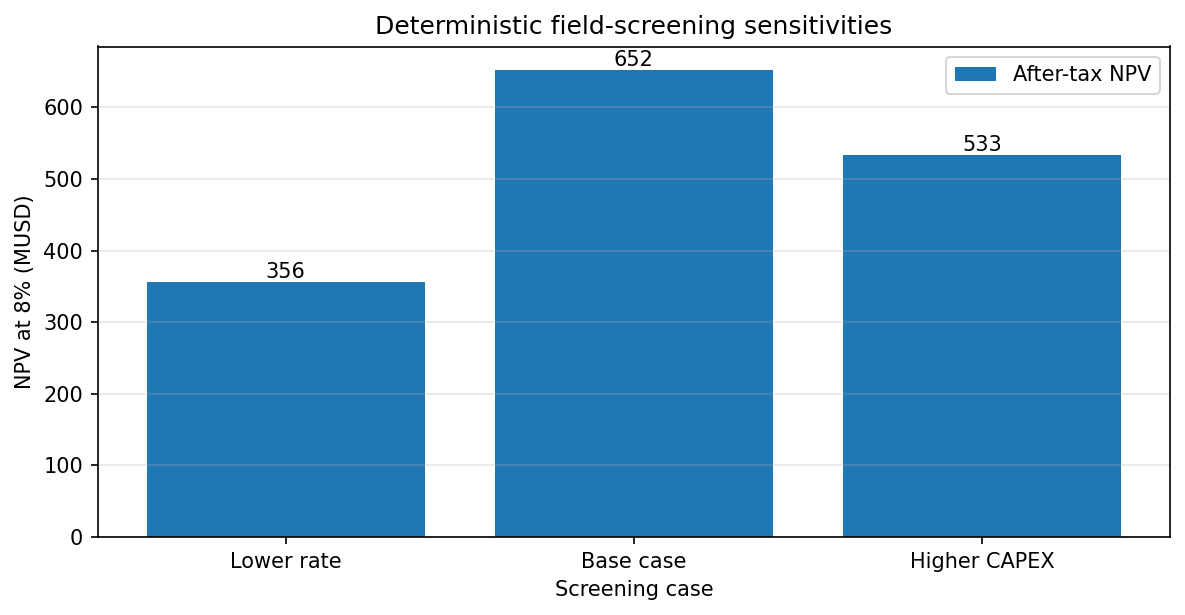
6. Interpretation and next fidelity step
The second figure confirms the expected directional response: lower gas rate and higher CAPEX both reduce NPV. These bounded cases are engineering checks, not probabilistic percentiles.
This notebook verifies the mechanics of an annual production profile and cash-flow screen. It does not model GIIP/STOIIP depletion, well deliverability, host capacity, multiphase hydraulics, product specifications, flow assurance, schedule uncertainty, or process equipment.
Before concept selection:
- Cap the forecast with a traceable recoverable-resource basis.
- Replace the synthetic profile with a reservoir/well/network forecast.
- Couple each concept to an independent
ProcessSystemorProcessModel. - Apply host and equipment limits before advancing reservoir state and economics.
- Add documented uncertainty distributions and correlations before reporting percentiles.
- Obtain discipline review of the technical, fiscal, cost, schedule, and safety basis.
For the physically coupled main-branch workflow, see Integrated Field Lifecycle Simulation. That API may be newer than the latest public Python package, so use a repository build when reproducing main-branch examples.