

Save results
Main results - saturated properties
The default is to save results to disk, mostly in .roff format. The main results from fmu-pem are also saved in .grdecl format, as this is required by seismic_forward, where they are used. Table 1 lists the different grids that are saved.
| Grid | Type | Example name | Comment |
|---|---|---|---|
| Density | Saturated rock properties | simgrid--density--20180101.roff | One for each simulator date |
| Vp | Saturated rock properties | simgrid--vp--20180101.roff | One for each simulator date |
| Vs | Saturated rock properties | simgrid--vs--20180101.roff | One for each simulator date |
| Vp/Vs | Saturated rock properties | simgrid--vpvs--20180101.roff | One for each simulator date |
| AI | Saturated rock properties | simgrid--ai--20180101.roff | One for each simulator date |
| SI | Saturated rock properties | simgrid--si--20180101.roff | One for each simulator date |
| Vp, Vs and Density | Saturated rock properties | pem--20180101.grdecl | One for each simulator date, three properties within one file |
Table 1: List of properties that are saved if save_results_to_disk is set. Note that the .grdecl files are always saved, regardless of the save_results_to_disk option
Intermediate properties
For QC purposes, intermediate results can also be saved. Table 2 lists the different properties that are included in the intermediate properties, which are effective properties for minerals and fluids, dry rock properties, grid showing cells that are below bubble point and modified porosity grid, can also be saved.
| Grid | Type | Example name | Comment |
|---|---|---|---|
| Fluid density | Effective fluid properties | simgrid--density_fluid--20180101.roff | One for each simulator date |
| Fluid bulk modulus | Effective fluid properties | simgrid--bulk_modulus_fluid--20180101.roff | One for each simulator date |
| Mineral density | Effective mineral properties | simgrid--density_mineral.roff | Static value |
| Mineral bulk modulus | Effective mineral properties | simgrid--bulk_modulus_mineral.roff | Static value |
| Mineral shear modulus | Effective mineral properties | simgrid--shear_modulus_mineral.roff | Static value |
| Pore pressure | Pressure properties | simgrid--pressure--20180101.roff | From the reservoir simulator, one for each date |
| Overburden pressure | Pressure properties | simgrid--overburden_pressure--20180101.roff | One for each date |
| Effective pressure | Pressure properties | simgrid--effective_pressure--20180101.roff | One for each date |
| Dry rock density | Dry rock properties | simgrid--density_dry_rock--20180101.roff | One for each simulator date |
| Dry rock bulk modulus | Dry rock properties | simgrid--bulk_modulus_dry_rock--20180101.roff | One for each simulator date |
| Dry rock shear modulus | Dry rock properties | simgrid--shear_modulus_dry_rock--20180101.roff | One for each simulator date |
| Below bubble point | Binary indicator | simgrid--below_bubble_point--20180101.roff | Grid indicating cells where the formation pressure is below the bubble point |
| Modified porosity | Porosity | simgrid--adjusted_porosity.roff | When net porosity is adjusted by non-net fraction |
Table 2: List of properties that are saved if save_intermediate_results is set.
Difference properties
Difference properties calculated between different simulation dates can be made for saturated rock properties and for convenience, also for input properties from the reservoir simulator. This is controlled by the differences settings in the parameter YAML file:
# For 4D parameters: settings for which difference parameters to calculate
diff_calculation:
  - attribute: ai
    methods: [diffpercent, ratio]
  - attribute: si
    methods: [diffpercent, ratio]
  - attribute: vpvs
    methods: [ratio]
  - attribute: twtpp
    methods: [diff]
  - attribute: density
    methods: [diffpercent]
  - attribute: vp
    methods: [diffpercent]
  - attribute: vs
    methods: [diffpercent]
  - attribute: swat
    methods: [diff]
  - attribute: sgas
    methods: [diff]
  - attribute: pressure
    methods: [diff]
Three different difference attributes can be calculated: difference, difference percent and ratio. In Table 3, example files of difference properties are shown.
| Grid | Type | Example name | Comment |
|---|---|---|---|
| SI ratio | Saturated rock properties | simgrid--siratio--20180701_20180101.roff | One for each difference date |
| Vp diffpercent | Saturated rock properties | simgrid--vpdiffpercent--20180701_20180101.roff | One for each difference date |
| TWT PP difference | Two-way travel time | simgrid--twtppdiff--20180701_20180101.roff | One for each difference date |
Table 3: List of some of the properties that can be saved if save_results_to_disk and diff_calculation options are set.
Output directories
All .roff files are saved to share/results/grids. The .grdecl files are saved to sim2seis/output/pem. The prefix in the .roff file names is taken from the SIMGRIDNAME in the global configuration file.
# Settings for saving results
results:
  save_results_to_disk: True
  save_intermediate_results: True
Example: comparison of fluid properties
An example on QC of fluid properties is comparison between effective fluid density as estimated from fmu-pem and from the reservoir simulator. The estimates should be close, as shown in Figure 1.
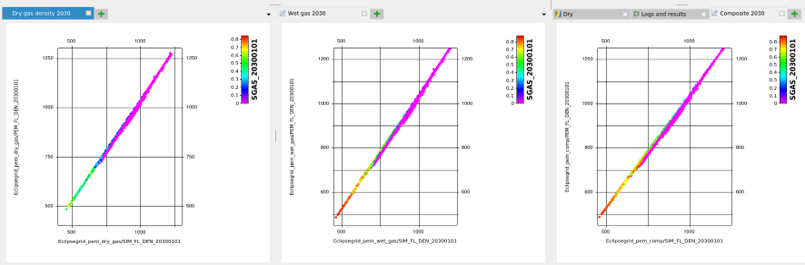
Figure 1: Estimate of fluid density from simulator model (x-axis) and PEM (y-axis) for a selected time step. With settings for either dry gas, wet gas or a compositional model, simulator model and PEM are in agreement.